 niklaslenz
sparkDash, Mia's dashboard and benchmark tool for DGX Spark fleets
A free web dashboard for NVIDIA DGX Spark boxes and other GPU machines, with decode, prefill, quality and tool-call benchmarks built in. I use it on every new setup on this site, in its own column. This page: what it is, how to start it, what it measures, how I use it, what I saw with version 2.70.0, and where it has limits.

At a glance
- Cost compare prices your own tokens at any hosted model's list price. It came from a community pull request and is in 2.70.
- Benchmarks are built in: decode, prefill, quality, tool eval and showcase. Mia measures her own recipes with it.
- Start and stop models from the browser. Ornith-1.5-122B was serving after one click.
- Alerts go to ntfy, Discord, Slack or a webhook. New in 2.70.
- The slot count on every TensorFold card tells you if requests are waiting. New in 2.70.
- Free, Apache 2.0. On 23 Oct 2026 the repository had 752 stars, 171 forks, 45 contributors and 559 commits since the first commit on 19 Jul.
What it is
sparkDash is a real-time web dashboard for one or more NVIDIA DGX Spark (GB10) machines in a single browser window. It streams GPU, CPU, unified memory, storage, network and local LLM metrics, and you add, edit or remove machines from the page, without a restart. It also works with any Linux machine with an NVIDIA GPU, and with macOS and Windows units.
It detects the model server on each machine (for example llama.cpp, vLLM, SGLang, LM Studio, Ollama, ds4-server, EXL3 or TensorFold) and shows live decode and prefill speed where the engine publishes counters. Mia says about 2.70: “This is a MAJOR release.” After one session with it I agree.
“This is a MAJOR release.”
How to start it
This is the quick start from the README (Docker needs to be installed). The dashboard then opens on port 5555 of that machine.
git clone https://github.com/MiaAI-Lab/sparkDash.git
cd sparkDash
docker compose up --build -d
Open http://127.0.0.1:5555 on the host. To reach it from another computer, keep the server on loopback and use an SSH tunnel (the README shows the command). The container runs privileged, because it reads host metrics. For development there is also npm install and npm run dev.
What it measures
- Decode. Streaming decode speed with 1 to 32 parallel requests. Prompt types: structured, prose, code and JSON.
- Prefill. Prefill speed and time to first token for context sizes from 1k to 300k.
- Quality. A fixed, seeded question set at temperature 0: QA (150 items), MMLU (285 items) and more categories, with a paired comparison of two runs and the exact McNemar p-value. When p is 0.05 or higher, the row reads “difference within noise”.
- Tool Eval. It runs tool-eval-bench against the served model and gives you a card to share.
- Showcase. Up to 32 prompts at once, streamed live in a full-page grid of terminals.
sparkDash never sends a request of its own to a model server just to measure speed. The live numbers come from the engine's own counters, and the benchmarks run on demand. Mia measures her recipes with it, in her words: “I am using my own sparkDash as the measurement.”
“I am using my own sparkDash as the measurement.”
How I use it here
- Own column, never mixed. Every new run on this site gets a sparkDash column next to my own tests. The numbers are never mixed with Speed v2 or Quality v2.
- The client is never in the measured group. sparkDash runs on another machine and talks to the server over the network, so it does not take part in the measurement.
- Fixed version. I run sparkDash 2.50.0 (commit 21a3511) for all runs, so the column stays comparable between setups. The newest version is 2.70.0.
- Settings. Quality: QA and MMLU, 435 items, seed 1234, temperature 0, thinking off; a reply cut off at the token limit counts as wrong. Decode: one request, 400 tokens, structured prompt, temperature 0, thinking off. Prefill: 4K, 8K, 16K and 32K. Tool Eval Quick: 15 scenarios.
Version 2.70 changed one default: the decode benchmark now runs at temperature 0.7, with thinking on for prose. The changelog says it clearly: “old and new results are not comparable.” A decode number from 2.70 and a number in my column are therefore not comparable either. I compare runs only at the same settings.
An example from this site
DeepSeek-V4.1-Flash-1017 as Q2 GGUF in antirez's ds4, on one Mac Studio M5 Ultra with 256 GB, measured on 23 Oct 2026. The values are from sparkDash 2.50.0, in the settings above:
| Part | Result |
|---|---|
| Quality, QA | 90.0 % (135 of 150), ±4.8 points |
| Quality, MMLU | 93.3 % (266 of 285), ±2.9 points |
| Decode, one request | 50.75 tok/s, first token after 270 ms |
| Prefill | 1,091 tok/s at 4K, 1,248 at 8K, 1,256 at 16K, 1,294 at 32K |
| Tool Eval Quick | 90 of 100 (13 of 15 scenarios passed) |
My own Speed v2 test on the same setup shows 54.5 tok/s decode. The two tools use different prompts, so the two numbers differ, and that is why they have separate columns. The page of that setup has the exact commands and all raw files: sparkDash section of the ds4 recipe page.
What I saw with 2.70.0
I ran sparkDash 2.70.0 on two of my four DGX Sparks for one session and tried the features people talk about most. Version 2.70.0 came out on 22 Oct.
My setup
Two GB10 boxes, one model across both, then one model on one box: a Gigabyte AI TOP ATOM and a Lenovo ThinkStation PGX, linked directly over ConnectX-7. The dashboard ran on my Mac Studio. First Mia's DeepSeek-V4.1-Flash-1017 recipe on both DGX Sparks with TensorFold TP2. Then Mia's Ornith-1.5-122B recipe on the PGX alone, started from sparkDash itself. My DGX Sparks run with the clock capped at 2,200 MHz.
Cost compare
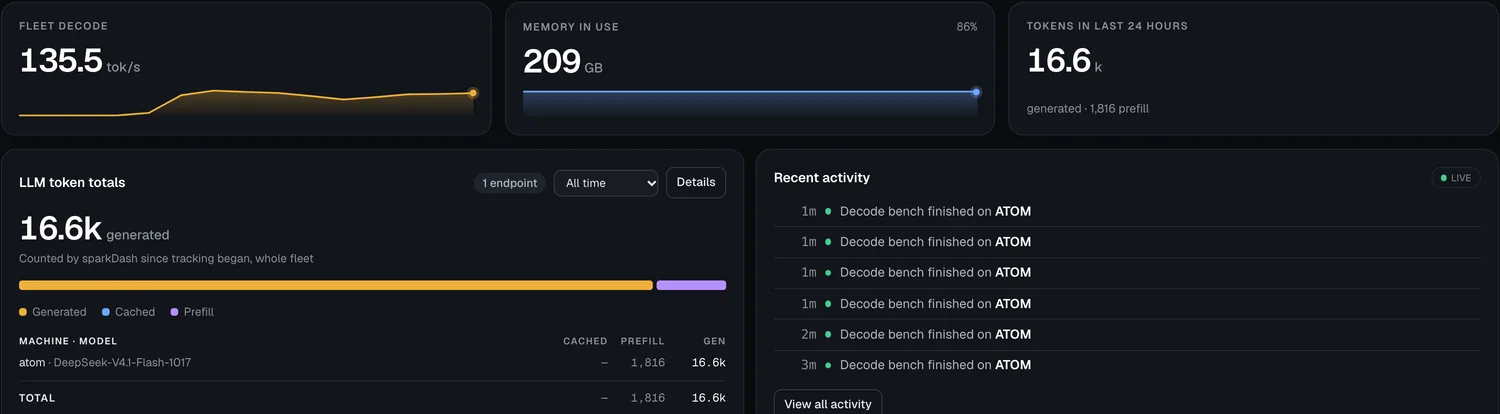
sparkDash now tells you what your own tokens would cost on a hosted API. It takes the token counters it already keeps for your fleet and prices them at any hosted model's list price: prompt tokens at the input rate, generated tokens at the output rate, and cached prefill at the provider's cache-read rate when one is published. Prices come from the community litellm catalog, about 2,900 chat models, searchable.
It came from the community: fish-not-phish opened the pull request (#231) on 16 Oct, Mia reviewed it, and it landed on main on 19 Oct with fish-not-phish as the author.
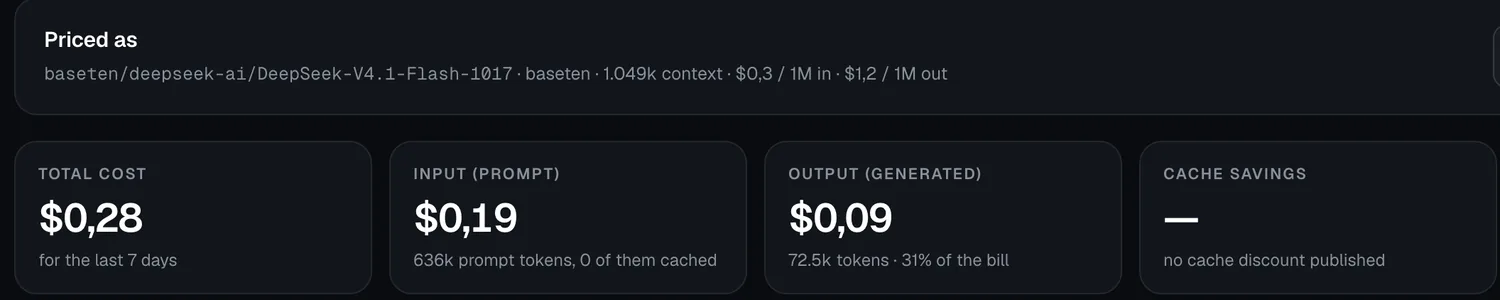
What I saw: I priced my DeepSeek tokens at Baseten's list price for DeepSeek-V4.1-Flash-1017, from the catalog fetched on 22 Oct at 16:04. Input $0.30 and output $1.20 per 1M tokens. 636k prompt tokens cost $0.19, 72.5k generated tokens cost $0.09, the total is $0.28.
Decode benchmark
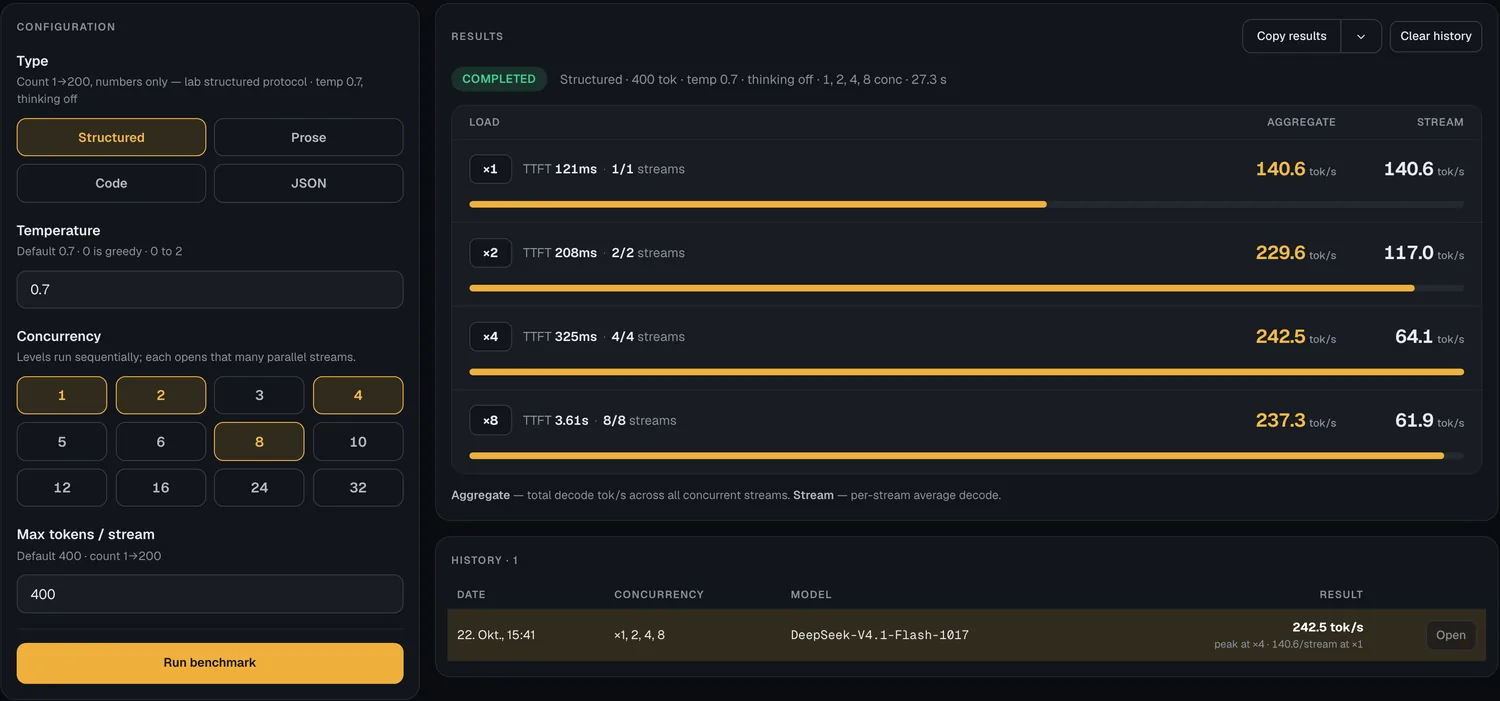
The 2.70 decode settings next to the old ones: temperature 0.7 and thinking on by default, both selectable. DeepSeek on two DGX Sparks, structured prompt, 400 tokens, temperature 0.7, thinking off:
| Requests at once | Total decode speed |
|---|---|
| 1 | 140.6 tok/s |
| 2 | 229.6 tok/s |
| 4 | 242.5 tok/s |
| 8 | 237.3 tok/s |
The structured prompt counts from 1 to 200, so it decodes faster than prose. The thinking switch, prose prompt, one request, temperature 0.7: 60.8 tok/s with thinking and 74.0 tok/s without. Reasoning tokens count toward decode tok/s.
Start and stop models from the browser
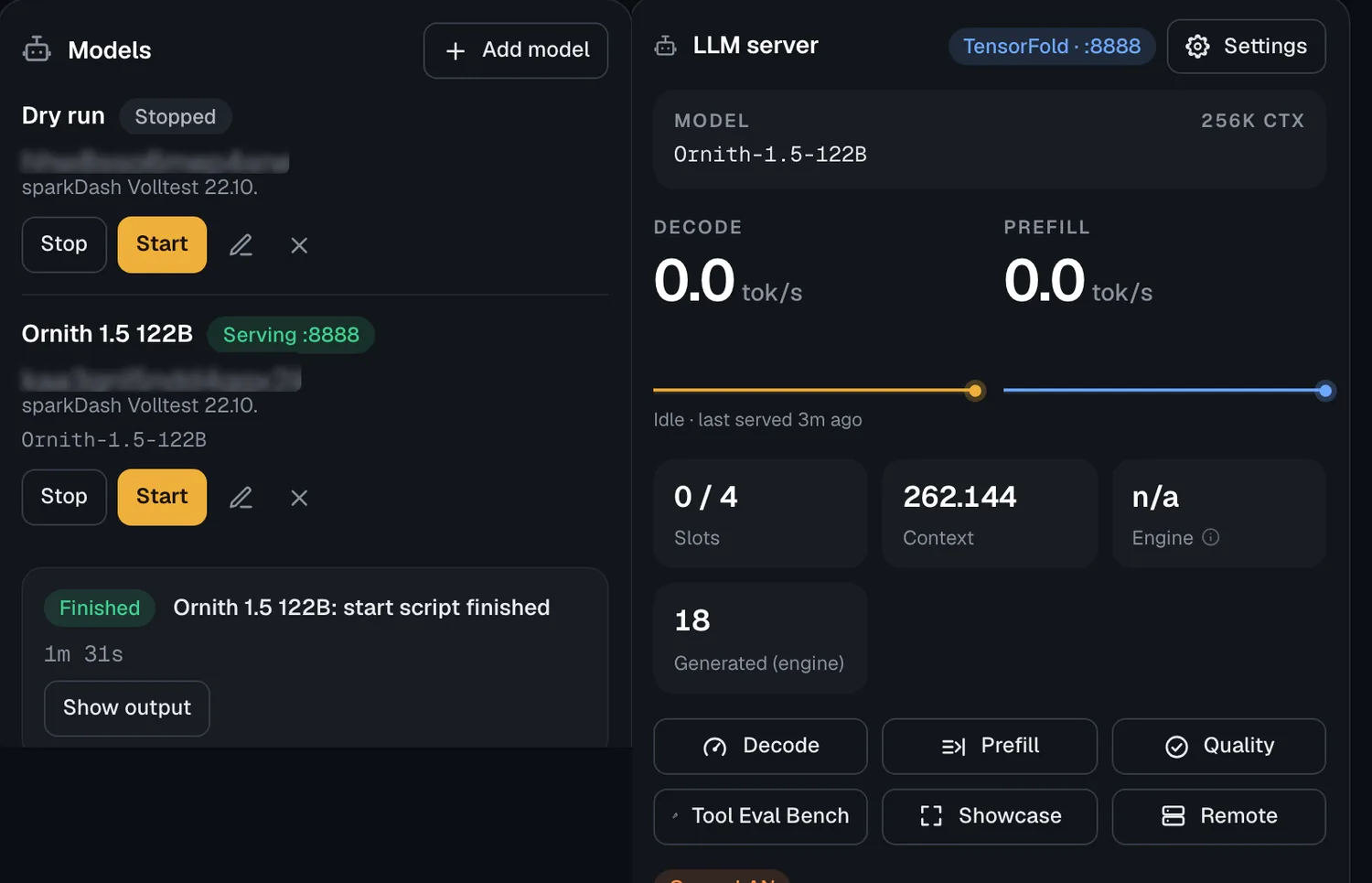
You register a folder with a start.sh and a stop.sh for a DGX Spark. Start and Stop then sit in the Models panel, and the script output streams live in the browser. I registered the scripts for Mia's Ornith recipe on the PGX. One click on Start, and the start script was done after 91.6 s, with the model serving on port 8888. The LLM panel then showed TensorFold, 262,144 tokens of context and 4 slots.
Quality and Tool Eval
Quality runs fixed question sets against the served model and compares two runs item by item. In 2.70 the history and the “Compare with” picker cover every port on the unit. On DeepSeek, two runs compared in the dashboard: QA 141 of 150 (94.0 %), MMLU 262 of 285 (91.9 %), and 0 of 435 shared items where the two runs disagree. These are the same QA and MMLU numbers as my sparkDash 2.50.0 run on the same recipe earlier that day.

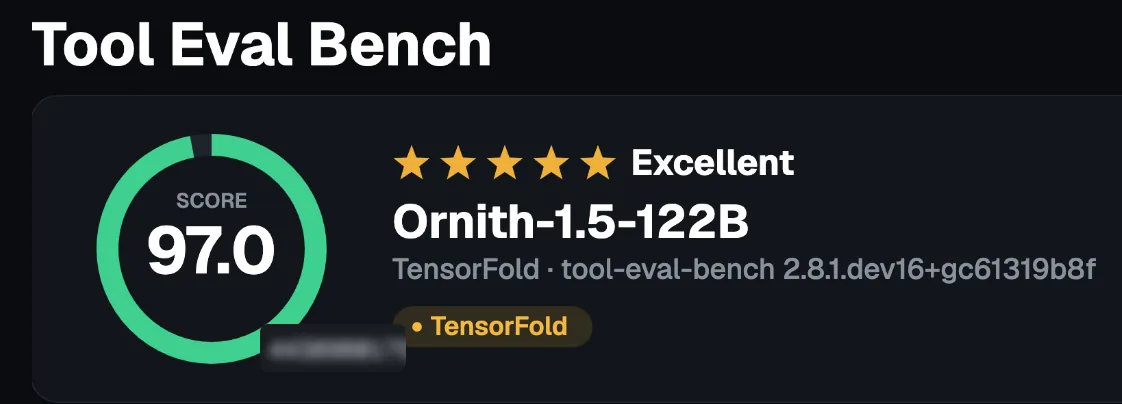
Tool Eval runs tool-eval-bench against the served model. Ornith-1.5-122B on one DGX Spark, short run, 15 scenarios, seed 42: score 97 of 100 (“Excellent”), 14 passed, 1 partial, 0 failed, in 2 min 31 s.
Alerts
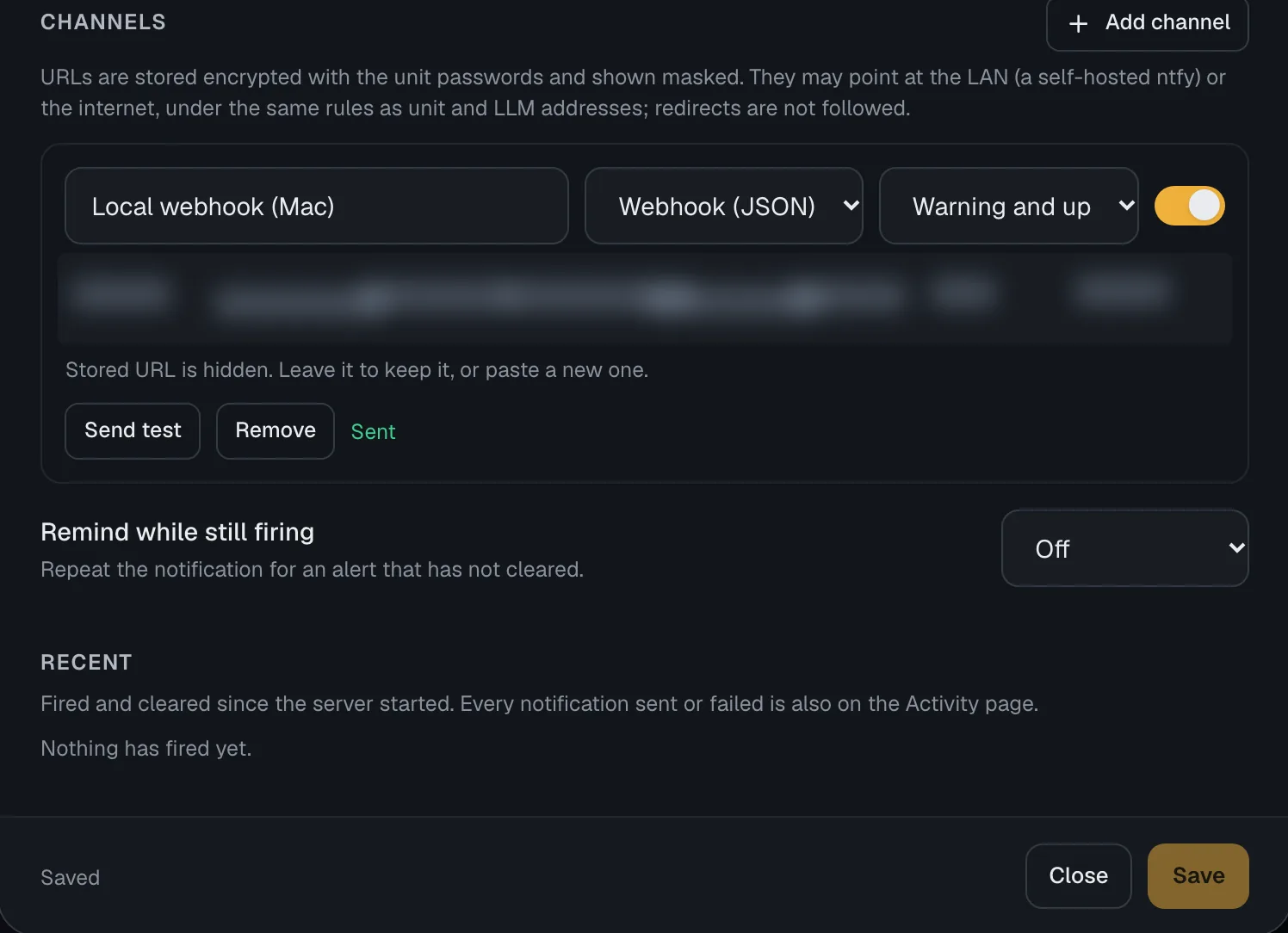
New in 2.70: sparkDash can tell you when something is wrong, even with no dashboard open. It sends its health findings to ntfy, Discord, Slack or a webhook, and it stays off until you turn it on. I pointed it at a small webhook on my Mac, and the test message arrived. When I stopped DeepSeek, “LLM is unavailable” arrived on its own. Once Ornith served on the PGX, the “resolved” message followed.
The slot count on the card
New in 2.70: the card shows how many requests the engine decodes at once. Before, a server with four slots looked the same as one with eight. The change came from danieljohnmorris (#238). With eight requests on DeepSeek it read “4 running · 4 queued · 4 slots”.

What I did not test
2.70 also adds support for Strata, NVIDIA Flare, Radiance and Intel Arc GPUs. I have none of those engines or cards here, so I leave them out. I used two of my four DGX Sparks for this test.
What people like
Quotes from public posts on X, word for word, short, each with its source. Nobody on this list gave numbers in the post I quote.
“sparkDash monitors and benchmarks the engine, while TensorFold runs the model. They work together”
“Cost compare. That’s the page.”
“Including cached-prefill savings is what makes the cost compare honest.”
“I had my own app for running start/stop scripts of models but now they are included in the sparkdash”
“I had my own. Not anymore. This is way better.”
“now I can sunset my custom grafana fleet monitor”
From first commit to ecosystem
The first commit was on 19 Jul 2026. Three months later the project has 559 commits and 45 contributors (GitHub, 23 Oct 2026). People build their own things on top of it, for example an ESP32 AMOLED companion (mfellner/sparklet), a Kobo e-ink dashboard (palmsnipe/kobo-spark), a macOS menu bar monitor (sambitcreate/sparkbar-mac-dgx) and an Omarchy bar widget (patcastle/omarchy-sparkdash).
Limits
- Versions are not comparable. Since 2.70 the decode benchmark defaults to temperature 0.7 with thinking on for the prose prompt; before, it ran at temperature 0 with thinking off. The changelog says old and new results are not comparable. It also notes that on servers that use speculative decoding, a temperature above 0 can be several times slower. Compare runs only at the same settings and the same version.
- Earlier versions had measurement bugs. The changelog for 2.70.0 lists, among others, two: the decode benchmark changed the task as streams were added, and the vLLM prefill rate counted prefix-cache hits as prefill work. Both are fixed in 2.70.0. This is one reason my column stays on one fixed version and says which.
- The question sets are short. QA has 150 items and MMLU 285. On the ds4 run above, the 95 % margin of error is ±4.8 and ±2.9 points. A gap of a few points between two models can be noise, and the tool itself says “difference within noise” when it cannot tell.
- Its speed is not my Speed v2. It uses its own prompts. The structured decode prompt counts from 1 to 200, which is easier than prose. Compare sparkDash with sparkDash, and Speed v2 with Speed v2.
- Tool Eval needs the exact model name. My first sparkDash run on the Mac failed in the Tool Eval part, because the request used a name the server does not list. I discarded that run and measured again with the listed name.
- Cost compare uses list prices. It prices your tokens at a hosted model's list price from a community catalog. If the catalog publishes no cache discount for a model, none is shown.
- Open issues. On 23 Oct 2026 the repository had 5 open issues. Two concern two-node setups: #271, token totals stop when the engine API moves to the worker node, and #270, the RoCE panel does not show RDMA traffic during TP2 decode (I reported that one; the changelog now explains the counter scope, and dedicated RDMA counters stay a feature request).
Links
- sparkDash on GitHub: github.com/MiaAI-Lab/sparkDash (Apache 2.0 from version 2.0.0 on)
- Mia's project page: mia-ai.net/lab/projects/sparkdash
- Mia's DeepSeek recipe on two DGX Sparks, with every number, the exact command and the voxel world it built (you can play it in your browser): niklaslenz.com/v2/deepseek-v41-flash-2sparks-mia-tensorfold/
- How I test, and where sparkDash fits: How I test
sparkDash and both recipes by Mia (@MiaAI_lab), TensorFold by Ash Hart (@ashxhart).